Add sources to your DAG
Related reference docs
(Applies to dbt v2.0 and later)Using sources
Sources make it possible to name and describe the data loaded into your warehouse by your Extract and Load tools. By declaring these tables as sources in dbt, you can then
- select from source tables in your models using the
{{ source() }}function, helping define the lineage of your data - test your assumptions about your source data
- calculate the freshness of your source data
Declaring a source
Sources are defined in .yml files nested under a sources: key.
sources:
  - name: jaffle_shop
    database: raw
    schema: jaffle_shop
    tables:
      - name: orders
      - name: customers

  - name: stripe
    tables:
      - name: payments
*By default, schema will be the same as name. Add schema only if you want to use a source name that differs from the existing schema.
If you're not already familiar with these files, be sure to check out the documentation on properties.yml files before proceeding.
Selecting from a source
Once a source has been defined, it can be referenced from a model using the {{ source()}} function.
select
  ...

from {{ source('jaffle_shop', 'orders') }}

left join {{ source('jaffle_shop', 'customers') }} using (customer_id)
dbt will compile this to the full table name:
select
  ...

from raw.jaffle_shop.orders

left join raw.jaffle_shop.customers using (customer_id)
Using the {{ source () }} function also creates a dependency between the model and the source table.
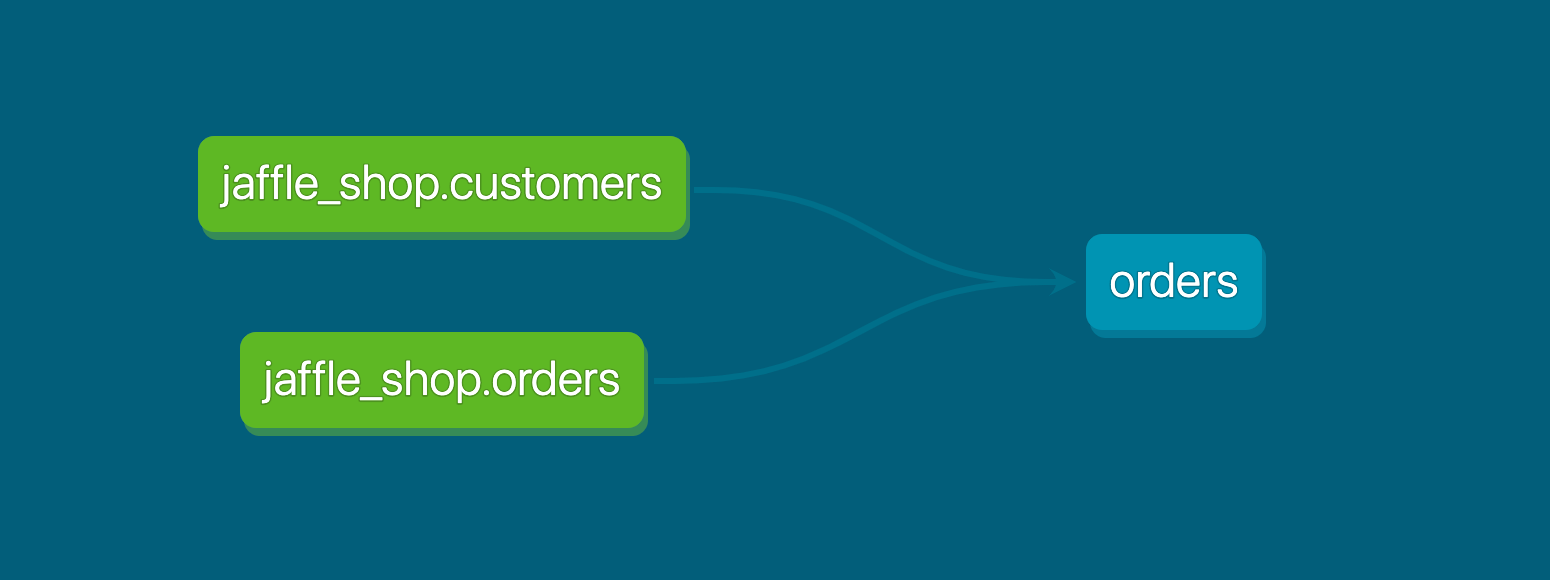 The source function tells dbt a model is dependent on a source
 Testing and documenting sources
You can also:
- Add data tests to sources
- Add descriptions to sources, that get rendered as part of your documentation site
These should be familiar concepts if you've already added data tests and descriptions to your models (if not check out the guides on testing and documentation).
sources:
  - name: jaffle_shop
    description: This is a replica of the Postgres database used by our app
    tables:
      - name: orders
        database: raw
        description: >
          One record per order. Includes cancelled and deleted orders.
        columns:
          - name: id
            description: Primary key of the orders table
            data_tests:
              - unique
              - not_null
          - name: status
            description: Note that the status can change over time

      - name: ...

  - name: ...
You can find more details on the available properties for sources in the reference section.
FAQs
Source data freshness
With a couple of extra configs, dbt can optionally capture the "freshness" of the data in your source tables. This is useful for understanding if your data pipelines are in a healthy state, and is a critical component of defining Service Level Agreements (SLAs) for your warehouse.
dbt v2 and dbt State
dbt State works with all engines and environments: dbt v1, dbt platform, and dbt v2
If you were using state-aware orchestration prior to June 1, 2026, you can continue using it. Once you start your free dbt State trial, it will be extended beyond the standard 30-day period. If the extension isn't applied to your account, contact your account team. To get started, refer to Migrate from state-aware orchestration.
If you're using dbt v2 with dbt State, dbt automatically tracks source freshness using warehouse metadata. You don't need to configure warn_after or error_after for dbt to detect when source data changes.
If you're using dbt State, use lag_tolerance to control how frequently models rebuild based on upstream data changes. You can also configure loaded_at_field or loaded_at_query on your source for more accurate freshness detection (for example, for streaming data or late-arriving records).
However, you should still configure source freshness if you want to:
- Receive SLA alerts when sources don't update within expected timeframes.
- Define custom freshness logic using
loaded_at_fieldorloaded_at_query(for example, for streaming data or partial loads). - Track freshness for source views. dbt v2 treats views as "always fresh" since it can't determine freshness from view metadata.
Declaring source freshness
To configure source freshness information, add a freshness block to your source and loaded_at_field to your table declaration:
sources:
  - name: jaffle_shop
    database: raw
    config:
      freshness: # default freshness
        # changed to config in v1.9
        warn_after: {count: 12, period: hour}
        error_after: {count: 24, period: hour}
      loaded_at_field: _etl_loaded_at # changed to config in v1.10

    tables:
      - name: orders
        config:
          freshness: # make this a little more strict
            warn_after: {count: 6, period: hour}
            error_after: {count: 12, period: hour}

      - name: customers # this inherits the default freshness defined in the jaffle_shop source block at the beginning


      - name: product_skus
        config:
          freshness: null # do not check freshness for this table
In the freshness block, one or both of warn_after and error_after can be provided. If neither is provided, then dbt will not calculate freshness for the tables in this source.
Additionally, the loaded_at_field is required to calculate freshness for a table (except for cases where dbt can leverage warehouse metadata to calculate freshness). If a loaded_at_field, or viable alternative, is not provided, then dbt will not calculate freshness for the table.
These configs are applied hierarchically, so freshness and loaded_at_field values specified for a source will flow through to all of the tables defined in that source. This is useful when all of the tables in a source have the same loaded_at_field, as the config can just be specified once in the top-level source definition.
Evaluate source freshness
(Applies to dbt v2.0 and later)To evaluate freshness for your sources, use dbt freshness with --resource-type source:
dbt freshness --resource-type source
Running dbt freshness without a resource type evaluates every source and model that has a freshness config.
Behind the scenes, dbt uses the freshness properties to construct a select query, shown below. You can find this query in the query logs.
select
  max(_etl_loaded_at) as max_loaded_at,
  convert_timezone('UTC', current_timestamp()) as calculated_at
from raw.jaffle_shop.orders
The results of this query are used to determine whether the source is fresh or not:
(Applies to dbt v2.0 and later)$ dbt freshness --resource-type source
Passed source jaffle_shop.orders (last updated 32m 14s ago) [0.42s]
Stale source jaffle_shop.customers (last updated 2days 6h 18m ago) [0.39s]
[error] [StaleSource (dbt1063)]: Stale source source.jaffle_shop.jaffle_shop.customers
--> models/<filename>.yml
Build models based on source freshness
Our best practice recommendation is to use data source freshness, configured in your .yml files using the freshness config.
To build models based on source freshness in dbt:
-
(Applies to dbt v2.0 and later) Run
dbt freshness --resource-type sourceto check the freshness of your sources. - Use the
dbt build --select source_status:fresher+command to build and test models downstream of fresher sources.
Using these commands in order makes sure models update with the latest data. This eliminates wasted compute cycles on unchanged data and builds models only when necessary.
Set source freshness checks to 30 minutes, then run a job which rebuilds every hour. This setup retrieves all the models and rebuilds them in one attempt if their source freshness has expired. For more information, refer to Source freshness check frequency.
You can also use dbt State for this use case. Set the lag_tolerance config to control how much time must pass since the last upstream data change before dbt triggers a rebuild, without chaining commands manually.
Filter
Some databases can have tables where a filter over certain columns are required, in order prevent a full scan of the table, which could be costly. In order to do a freshness check on such tables a filter argument can be added to the configuration, for example, filter: _etl_loaded_at >= date_sub(current_date(), interval 1 day). For the example above, the resulting query would look like
select
  max(_etl_loaded_at) as max_loaded_at,
  convert_timezone('UTC', current_timestamp()) as calculated_at
from raw.jaffle_shop.orders
where _etl_loaded_at >= date_sub(current_date(), interval 1 day)
FAQs
Was this page helpful?
This site is protected by reCAPTCHA and the Google Privacy Policy and Terms of Service apply.